
WPZone Schema
Add schema.org structured data to WordPress in minutes.
Lightweight, flexible, and designed for clean SEO.
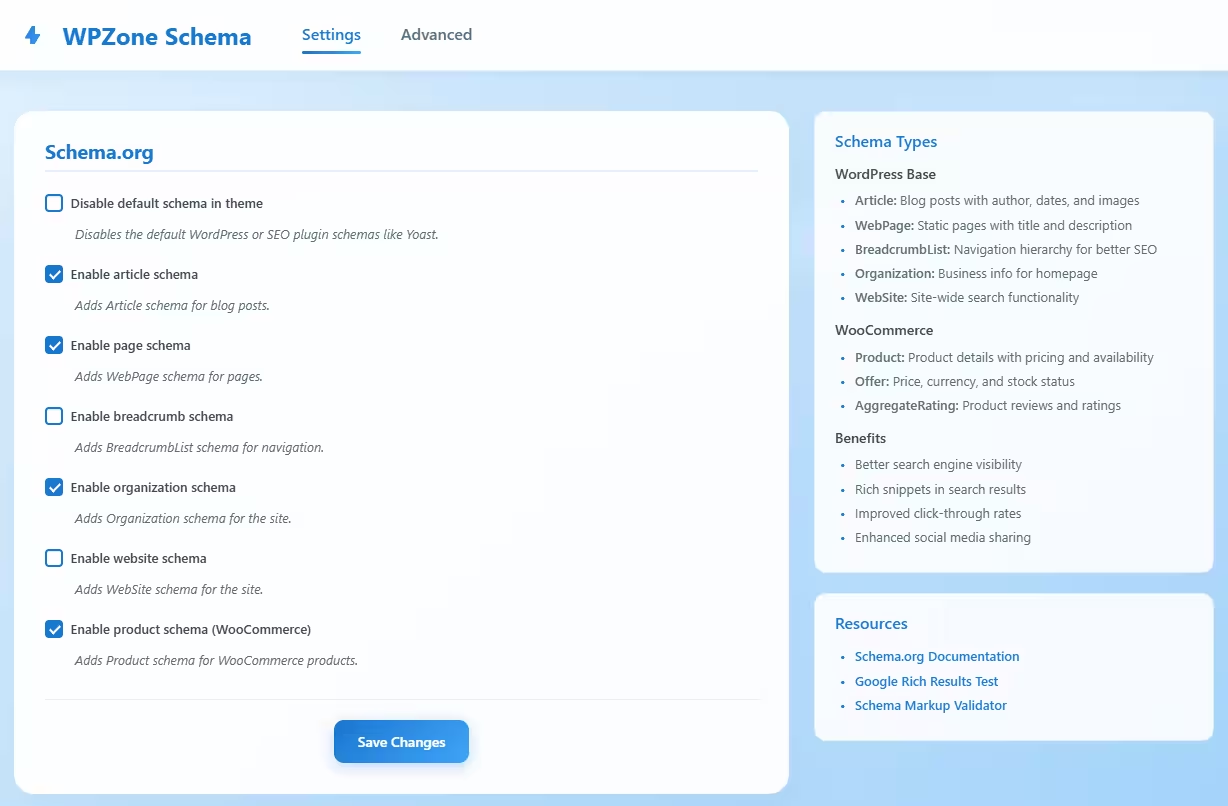
WPZone Schema is a free WordPress plugin that makes schema.org implementation simple, fast, and clean.
Enable the most important schema types (like Article, WebPage, Organization, Product, and more) with a lightweight interface, without relying on heavy SEO suites.
Features
- Enable core schema types site-wide (Article, WebPage, Organization, WebSite, BreadcrumbList)
- WooCommerce-ready Product schema (with pricing and availability)
- Disable theme/SEO plugin default schema to avoid duplicates
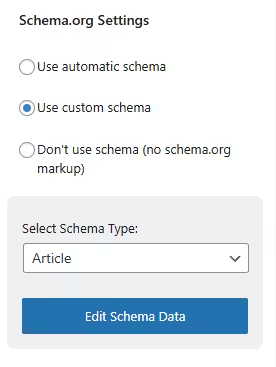
- Per-post schema metabox: automatic, custom, or no schema
- Choose schema type per page (Article, Book, Course, Dataset, Event, Fact Check, Image Metadata, Job Posting, Recipe, Product, Video or custom)
- Lightweight and predictable output (clean JSON-LD)
Why a dedicated schema plugin?
Many SEO suites output schema automatically, but that often comes with heavy features, hidden dependencies, and limited control.
WPZone Schema focuses on one goal: structured data that is easy to manage, flexible per page, and safe from duplicates.
It’s designed to be a clean foundation and a simple starting point for structured data in WordPress.
- • No SEO bloat or unnecessary features
- • Clear control over schema output (site-wide + per page)
- • Helps prevent duplicate schema from themes or other plugins
- • Ideal for performance-focused sites, devs, and agencies
WPZone Schema keeps structured data simple and predictable.
Use it standalone or alongside your SEO plugin while maintaining control over what markup is actually output.
SEO Suites
All-in-one platforms
Schema is tied to other SEO features
Markup output can change when SEO settings, modules, or presets change
Harder to debug duplicates
Themes and plugins may output overlapping schema with limited visibility
More overhead
You install a large suite even if you only need structured data
Limited per-page control
Custom schema can require paid add-ons or complex workflows
WPZone Schema
Focused structured data
Site-wide toggles for core schema
Enable/disable Article, WebPage, Organization, WebSite, BreadcrumbList and more
Per-post metabox control
Automatic schema, custom schema, or disable schema entirely
Duplicate-safe approach
Option to disable default theme/SEO markup to keep output clean
Lightweight and flexible
Focused on schema.org output without SEO suite bloat
WPZone Schema is not meant to replace your SEO plugin.
It complements any setup by giving you clean, predictable structured data controls
without the overhead or dependency of a full SEO suite.
Who is WPZone Schema for?
- Bloggers and publishers who want correct Article schema
- WooCommerce stores that need Product markup (price, stock, ratings)
- Agencies managing many sites and avoiding schema conflicts
- Developers who want predictable, debuggable JSON-LD output
- Anyone who wants per-page schema control without complex setups
Why WPZone Schema is a valuable addition
Structured data is easiest when it’s consistent and easy to control. WPZone Schema provides a free, lightweight foundation that works on any WordPress site.
Why structured data matters?
Eligibility for rich results
Correct schema.org markup increases the chance of enhanced SERP features like product snippets, breadcrumbs, and rich previews.
Cleaner, safer output
Duplicate or conflicting schema can reduce trust and create validation errors. A focused plugin helps keep markup consistent.
Better content understanding
Structured metadata helps search engines interpret your pages more accurately especially articles, products, and media pages.
Why Use WPZone Schema?
What does WPZone Schema do?
WPZone Schema adds schema.org JSON-LD structured data to your WordPress site with a simple interface. You can enable core schema types site-wide and customize schema per post via a metabox.
Can it prevent duplicate schema from themes or SEO plugins?
Yes. WPZone Schema includes an option to disable default schema output from themes or other plugins, helping you avoid duplicate markup and validation warnings.
Can I set schema per page or post?
Yes. Use the metabox to choose automatic schema, custom schema, or disable schema for that specific page. You can also select a schema type like Article, Product, Video, Recipe, Job Posting, and more.
Is WPZone Schema a replacement for SEO plugins?
No. It’s a focused structured data plugin. It works alongside SEO plugins by providing clean, predictable schema controls without adding SEO suite bloat.
Why is the plugin free?
WPZone Schema is a free plugin designed to simplify structured data for everyone and introduce advanced features available through the WPZone license.